The Strategist - Copyright (c) Oxeye Game Studio 2004-2007
http://www.oxeyegames.com
Last Modified: 2 May 2007
Game Version: 2.5a
When you register the full version you will get the following extra features:
- Play all scenarios in the campaigns! More than 30 missions!
- Play with up to 10 players!
- Play with teams!
- Create your own missions and campaigns!
Please check http://www.oxeyegames.com for more information!
Additional Credits
The "daisy" engine contains a JPEG implementation, which has been made by Independent JPEG Group.
A number of sound effects has been based on the work by people at The Free Sound Project:
- Richard Fröhlich, http://freesound.iua.upf.edu/usersViewSingle.php?id=71614
- acclivity, http://freesound.iua.upf.edu/usersViewSingle.php?id=37876
- Dynamicell, http://freesound.iua.upf.edu/usersViewSingle.php?id=47052
- NoiseCollector, http://freesound.iua.upf.edu/usersViewSingle.php?id=4948
- FreqMan, http://freesound.iua.upf.edu/usersViewSingle.php?id=92661
- ermine, http://freesound.iua.upf.edu/usersViewSingle.php?id=15220
- Heigh-hoo, http://freesound.iua.upf.edu/usersViewSingle.php?id=21830
1.1 What is The Strategist?
The Strategist is a turn-based strategy wargame. The goal of the game is to attack and conquer all your enemies'
command centers. You can play with friends locally or over the Internet, or against the computer, in teams or
free for all. Starting with version 2.4 you can also play single-player campaigns or multi-player games on
custom maps with events and triggers.
1.2 Requirements - Macintosh
- Mac OS X 10.3 or later
- A 3D-accelerated graphics card
- 800 MHz CPU
1.3 Requirements - Windows
- Windows 98, 2000, XP or Vista
- DirectX 9 or later
- A 3D-accelerated graphics card
- 800 MHz CPU
1.4 Troubleshooting
If you encounter problems while playing The Strategist, please let us know by mailing support@oxeyegames.com
or visiting our forums.
1.5 Known Problems
- It has been reported that if you have anti-alias turned on there can appear lines in the graphics. To solve this problem, turn of
anti-aliasing in your video card settings (set it to "let the application decide").
- If you are using a firewall, which obviously is a good habit, you may experience some problems when joining or creating network
games. Most firewalls will display a warning message when the game tries to connect to the Internet, and this warning message may
appear "behind" the game, which causes the computer to freeze. A solution to this problem is to run the game in windowed mode (deselect
"Fullscreen" in the "Settings" tab and press "Apply") the first time you want to start a network game, and then return to fullscreen
mode when you have configured your firewall.
1.6 Contact
Support contact: support@oxeyegames.com
Please visit Oxeye Game Studio for further contact information.
2.1 Placing Reinforcements
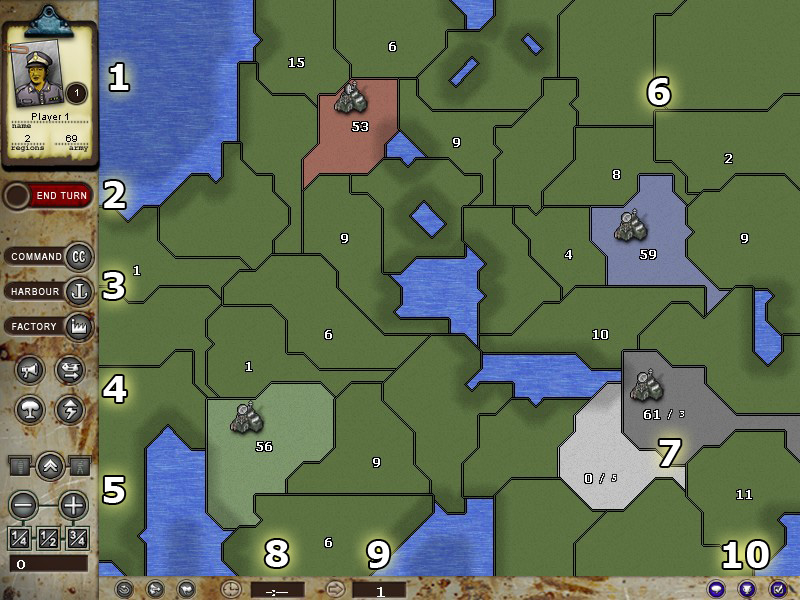
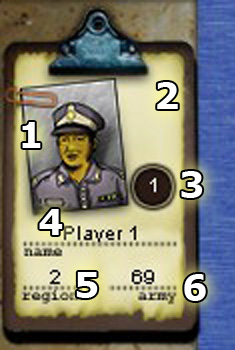
In the first turn every player must place their starting point, their first Command Center. This is done by just clicking
on a neutral region when it's your turn. You will receive 50 bonus troops in that region to begin with.
In all following turns you will receive reinforcements that you can place in one of your own, or an ally's, region.
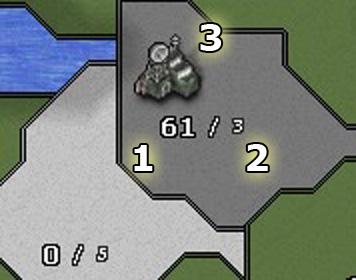
You receive 3 units for each region you control. You will receive 4 units if
you have captured an enemy Command Center the previous turn. The maximum number of reinforcements you
can get is 30 (or 45 with the Command Center bonus).
2.2 Using Actions
Each turn you have a limited number of actions. You receive one action for every "Command Center" you control, and
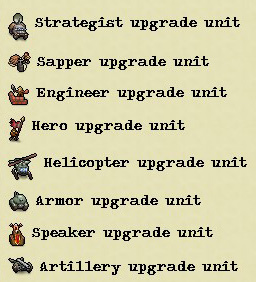
one action if you have a "Strategist" upgrade unit.
With an action you can do one of the following:
1. Use unmoved troops to attack a neighbor region
2. Build a new Command Center in a region
3. Build a harbour in a region which is connected to water
4. Build industries in a region which hasn't a Command Center or industries already
5. Use a special action
2.3 Attacking
To expand your empire you must use actions to attack neighbor regions. Attacking a neutral region (dark green) will
always succeed and also give you bonus troops. Attacking an enemy region will cause damage on both your force as
well as the defending force according to the following formula:
1. The damage done on the defender is 50% of the attacker's unmoved troops that are attacking
2. The damage done on the attacker is 25% of the defender's troops.
Attacking from a harbour is not as efficient as attacking by land, but also safer. When attacking via water, the
amount of damage is based on the distance between the two regions. If the target region doesn't have a harbour, it
will not be able to defend itself.
Note that the attacker deals more damage than the defender, so it can be advantageous to make the first attack (which
obviously will require at least one action).
When damage has been resolved the defender may lose his region if there are no troops left. To take control of a
region the attacker must have a "power majority" in the neighbors to that region. Regions with harbours are neighbors
to all regions which are connected to the same water mass, but their troops only count as 50% when determing power
balance.
There are a number of reasons why you are unable to attack a region:
- The regions are not connected
- The target region hasn't got any troops, and you don't have majority around that region
- You are unable to deal any damage (such as when attacking with only one unit)
- You have already attacked with the region this turn
2.4 Moving Troops
All troops may be moved one step and become "tired". Tired troops can't be used for actions. Regions with harbours
can move troops to all other regions that are connected to the same water mass.
You can also move troops into regions that your allies control.
2.5 Special Action: Propaganda
The Propaganda action can be used on an enemy force to disable their units the next turn.
- The propaganda action will disable (make them tired) 33% of the regions active units.
- The propaganda action costs one action and 5 units to use.
- You may not target an enemy region which has the Command Center upgrade.
To use the propaganda action, select one of your command center which has at least 5 units, then press the
"Propaganda" button. Now click on the region you wish to target.
2.6 Special Action: Chopper Transport
The Chopper Transport action can be used to transport units from your command center to one of your own or an ally's
region.
- The chopper transport action will move up to 100 units from your command center to any region you, or an ally,
control.
- The chopper transport action costs one action to use.
To use the chopper transport action, select one of your command centers which has at least one unit, then press
the "Chopper Transport" button. If you want to move less than 100 units, change the value
in the "Move Troops:" edit box before you click on the destination.
2.7 Special Action: Destroy Development
The Destroy Development action will destroy an enemy harbour and/or industries anywhere on the map.
- The destroy development action will remove the harbour and/or industry upgrades from one enemy region.
- The destroy development action costs one action and 40 units to use.
- You may not target an enemy region which has the Command Center upgrade.
To use the destroy development action, select one of your command centers which has at least 40 units, then press
the "Destroy Development" button. Then click on the target region from which you want to
remove the harbour and/or industries upgrade.
2.8 Special Action: Blitz
This action allows you to remove the "tired" status from up to 100 units in any region that you control.
- The blitz action costs one action and 20 units to use.
To use the blitz action, select one of your command centers which has at least 20 units, then press
the "Blitz" button. Then click on the target region whereyou want to defatigue up to 100 units.
3.1 Version Changes
2006-05-02 2.5a
- Corrected a PowerPC-related license bug
- Changed the campaign menu layout slightly
2007-03-23 2.5
- Redesigned the GUI
- Added new map artwork
- Added an particle engine
- Added event particles for standard events
- Added particles to custom maps
- Added player color portraits
- Created a completely new campaign with 18 missions
- Removed the replay functionality
- Updated the old campaigns for the new features
- Changed blitz cost to 20 units
- Changed destroy development cost to 40 units
- Made it possible to restart a mission without leaving the game
- Created a central multi-player lobby
- Added sprites for soldiers
- Added environment sprites
2006-03-31 2.4
- Changed the victory condition system to be trigger-based
- Made it possible to load custom maps instead of generating random maps
- Made it possible to play on custom maps with custom triggers and scenarios
- Added a "view replay" option to the main menu
- Removed the help window again... this time it only appears in the tutorial campaign
- Added a campaign menu
- Made it possible to play and continue campaigns (campaign progress is stored), and to
view campaign scenario solutions
- Removed the option to disable "limited reinforcements"
- Added an option to disable "destroy development"
- Changed the messages when conquering named regions in custom maps
- Fixed a problem with the unit count edit box (when moving units)
- Added a screenshot button (F11)
- Added a button click sound effect
- Added an option to disable the "it's your turn" message
- Added world sprites for command centers, harbours and industries
2005-12-16 2.3
- Improved the help popups
- Improved the lobby, has support for lobby topics
- Added the "cylinder map" feature
- Added experimental replay recording and viewing
- Added message when a player is defeated
- Changed the game rules slightly when using the "Safe Begin" rule
2005-09-14 2.2
- Added help menu popups
- Changed the message log, it only displays errors now and it is set to "on" as default
- Corrected a minor visibility problem with the message lists
- Nicks are prefixed with "X-" in the game lobby now to indicate that they are in-game
- Toned down the intro music
- Corrected problems with nicks in the lobby
- Oups! Discovered that the installer didn't extract the readme as it should. Fixed!
2005-09-09 2.1
- Added an IRC-based lobby
2005-08-13 2.0a
- Corrected an error during reinforcements if a time-out occurred
- Corrected an error that allowed players to remove reinforcements
2005-08-13 2.0
- Completely reworked the art engine
- Completely changed how the game handles players
- Added "Build Industries" action
- Added "Blitz" action
- Changed the via-water attack rules
- Changed the max amount of units in a region to 500
- Completely reworked the network code
2004-08-10 1.0
- Released version
2004-04-14 Release Candidate 2
- Removed "Call for UN" special rule
- Added "Safe begin" special rule
- Corrected network problem
- Changed some sound effects
2004-04-12 Release Candidate 1
- Initial release
Mission 17 is a quite difficult puzzle mission that may require some help. To read the hints, select the text in your web browser:
Hint 1: You must use all 6 actions in the first turn, and at least 5 actions in the two other turns.
Hint 2: You must destroy both harbours, but you can only afford to use one Destroy Development action... the other harbour must be destroyed in a different manner.
Hint 3: Use Chopper Transport to move your Sapper, but make sure that your Armor has cleared her retreat first.
Hint 4: In the second turn, use Chopper Transport and Blitz to quickly destroy either Command Center with your armor. Remember to leave 20 units for the blitz action when you chopper. Repeat the procedure in turn 3.
Hint 5: The actions in the first turn are: Attack, move, attack, destroy development, chopper, blitz, attack, move.